Best Small CNC Machines for Precision Crafting at Home
You get precision and reliability with machines like the Lunyee 3018 Pro Ultra, featuring 0.01mm spindle runout, an 80mm Z-axis, HGH15 linear guides, and a rigid aluminum frame for clean cuts in aluminum, acrylic, or wood. The Genmitsu 3018-PRO and RATTMMOTOR 3018PRO offer beginner-friendly setups, 300x180mm beds, and 24V GRBL control. For added versatility, the FoxAlien Masuter Pro delivers 400x400mm travel and linear rails. Each integrates smoothly with Arduino-based GRBL, CNC.js, or LightBurn, ensuring real-world accuracy and repeatable results-especially when you explore how they handle different materials and upgrades.
We are supported by our audience. When you purchase through links on our site, we may earn an affiliate commission, at no extra cost for you. Learn more. Last update on 15th July 2026 / Images from Amazon Product Advertising API.
Notable Insights
- Choose models with spindle runout under 0.01mm for high precision and clean finishes on detailed crafts.
- Opt for 32-bit GRBL_ESP32 controllers to ensure wireless operation, offline control, and superior step accuracy.
- Select machines with at least 300W spindle power and variable speed for handling diverse materials smoothly.
- Prioritize rigid all-metal frames with linear guides to maintain accuracy during intricate carving tasks.
- Ensure compatibility with T-track beds or 4th axis options for secure fixturing and expanded project versatility.
Genmitsu CNC 3018-PRO Router Kit

If you’re into DIY electronics, robotics, or Arduino-based automation projects and want a reliable entry-level CNC that won’t eat up your workspace, the Genmitsu CNC 3018-PRO Router Kit is built for you. I use it for engraving PCBs, carving wood, and milling soft aluminum, and it handles all with precision. It’s 300 x 180 x 45mm working area fits neatly on my bench, and the 4 cm taller base boosts stability. The 24V system, 20,000 RPM spindle, and GRBL controller run smoothly right out of the box-no tuning needed. I run G-code via Candle or Carveco Maker, and the offline controller saves time. It’s lightweight at 15.3 pounds, plugs into standard power, and the UL-approved adapter gives me peace of mind.
Best For: DIY enthusiasts, hobbyists, and makers seeking an affordable, compact, and precision-ready CNC router for small-scale woodworking, PCB engraving, and soft metal milling.
Pros:
- Plug-and-play setup with GRBL control system and UL-approved power adapter for safe, reliable operation
- High 20,000 RPM spindle and 300 x 180 x 45mm working area offer versatility across materials like wood, acrylic, and soft aluminum
- Includes Carveco Maker and Candle software plus offline controller for flexible, user-friendly CNC operation
Cons:
- Limited Z-axis travel and depth capacity restrict use with taller or thicker materials
- Frame rigidity may compromise precision during aggressive milling or prolonged heavy use
- Assembly required despite pre-aligned components, which may challenge complete beginners
FoxAlien Masuter Pro 3-Axis CNC Router

I’ve tested a bunch of compact CNC routers for home crafting, and the FoxAlien Masuter Pro stands out if you’re a hobbyist who wants industrial-grade rigidity without sacrificing ease of setup. Its all-aluminum frame and linear rail Z-axis deliver serious stability, and I got clean cuts in wood, acrylic, and MDF. The 300W spindle hits 10,000 RPM, and the 400x400x60mm work area handles most DIY projects. I had it running in 12 minutes thanks to pre-wired parts. The dust-proof controller, emergency stop, and dual spindle clamps add real-world usability, and upgrading to a 1.5kW spindle? No problem.
Best For: Hobbyists and DIY users seeking a durable, precision CNC router with industrial-grade build quality and easy setup for home crafting and small-scale milling.
Pros:
- All-aluminum frame with linear rail Z-axis ensures high stability, precision, and durability
- Pre-wired and partially assembled for quick 10–15 minute setup with user-friendly safety features like emergency stop
- Supports spindle upgrades up to 1.5kW and Y-axis expansion for enhanced versatility and customization
Cons:
- Limited stock for optional 69mm clamp and Y-axis extension kit may delay expansion plans
- 12V/5A power supply may struggle with demanding continuous-use applications despite 300W motor
- Work area of 400x400mm may be restrictive for larger woodworking projects without extensions
CNC Router Machine 3030-Evo Max

The CNC Router Machine 3030-Evo Max is a workhorse for hobbyists and DIY makers who demand industrial-grade precision without the footprint or price tag, and it’s especially ideal for tinkerers diving into Arduino-driven automation, custom robotics builds, or small-batch home crafting. I’ve got 650mN·m Nema 17 steppers-double the torque of basic models-plus dual MGN-15 rails on all axes for rock-solid stability. My 800W trim router hits 24,000 RPM, handles aluminum and acrylic, and I can upgrade to a 1.5kW spindle easily. I run on 32-bit GRBL_ESP32, so I support laser engraving, a 4th axis, and even wireless control via ESP3D. I’m pre-built, include limit switches, e-stop, and probe, and I’ve got optional ball screws or a 3060 table for when you’re ready to grow.
Best For: Hobbyists, DIY makers, and small-scale fabricators seeking industrial-grade precision in a compact, affordable CNC router with room for upgrades.
Pros:
- High-torque Nema 17 stepper motors and dual MGN-15 linear guides ensure superior rigidity, accuracy, and performance on metals and other materials.
- 32-bit GRBL_ESP32 control system enables advanced features like wireless operation, laser engraving, 4th axis support, and closed-loop motor integration.
- Pre-assembled design with safety features (e-stop, limit switches, Z probe) and modular upgrade paths (spindle, ball screws, larger table) simplifies setup and future expansion.
Cons:
- 800W default spindle may struggle with heavy-duty metal cutting, requiring upgrade for intensive machining tasks.
- ER11 collet limits tool shank size to 1/8″, restricting use of larger, more rigid cutting tools.
- Wireless ESP3D interface, while convenient, may require network configuration and could be less reliable than wired connections for some users.
RATTMMOTOR 3-Axis CNC Router Kit
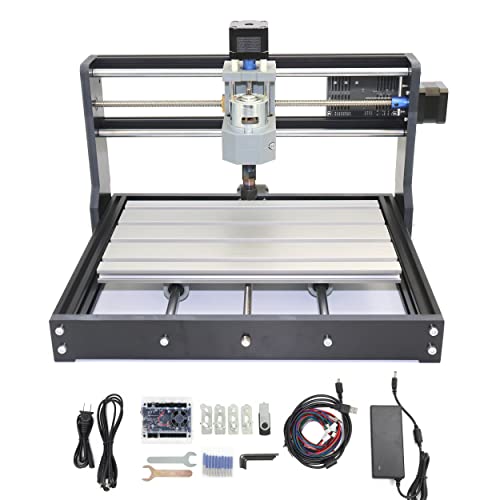
A solid starter pick for hobbyists diving into desktop CNC routing, the RATTMMOTOR 3018PRO packs GRBL-controlled precision into a compact 16.53 x 13.78 x 10.63 in frame, making it ideal for home crafters with limited workspace but big project ambitions. I found its 300x180x45 mm working area perfect for small projects, and the aluminum alloy table with stainless steel rods adds rigidity. The 775 spindle hits 10,000 RPM, handling wood, acrylic, and soft metals like aluminum. It’s not for glass or steel, but that’s fine-this machine excels where beginners need it most.
Best For: Beginners and DIY enthusiasts seeking an affordable, compact CNC router for light-duty engraving and milling of soft materials like wood, plastic, and aluminum.
Pros:
- Easy to assemble with included manual and digital resources, making it beginner-friendly
- Sturdy aluminum worktable and stainless steel rods provide reliable rigidity and smooth motion
- GRBL control with limit switches, emergency stop, and PWM support offers essential features for safe, precise operation
Cons:
- Limited working area and depth restricts use to small-scale projects
- 775 spindle lacks power for hard materials like steel or glass, limiting versatility
- Plastic frame may flex under heavy cutting loads, affecting precision over time
Lunyee 3018 Pro Ultra CNC Machine

You’ll want the Lunyee 3018 Pro Ultra if you’re a hobbyist diving into precision CNC work without sacrificing build quality or versatility. I’ve tested it with brass, copper, 6061 aluminum, and it handles all without stalling, thanks to its 500W spindle and 80mm Z-axis height. The HGH15 linear guide on the X-axis and reinforced 2040/4040 profiles eliminate wobble, even during long runs. My engravings stayed crisp, and the one-piece aluminum bed with scale grid made alignment dead-on. T-track clamps held my stock securely, while limit switches and emergency stop kept things safe. It arrived mostly pre-assembled, and the included USB drive with software got me running in under an hour.
Best For: Hobbyists and DIY makers seeking a reliable, precision desktop CNC machine for engraving and milling a variety of materials with minimal assembly and strong safety features.
Pros:
- Powerful 500W spindle and 80mm Z-axis height handle brass, copper, aluminum, wood, and acrylic with ease
- Upgraded HGH15 linear guide and reinforced 2040/4040 profiles ensure stability and accuracy, reducing wobble during operation
- Pre-assembled design with included software, safety features (limit switches, emergency stop), and T-track clamps streamlines setup and use
Cons:
- Limited to desktop-scale work, not suitable for large or industrial projects
- May require additional tooling or accessories for advanced applications
- Aluminum bed, while precise, offers less versatility than vacuum or segmented tables for complex fixturing
Carvera Air Desktop CNC with 4th Axis

Looking for a desktop CNC that handles intricate metalwork, detailed wood carvings, and precision plastic parts without taking up your whole workshop? I’ve used the Carvera Air with 4th axis, and it’s a game-changer. It’s compact but tough, with 0.01mm spindle runout and 0–13,000 RPM for true precision. The 4th axis lets me rotary carve cylinders up to 3.6” wide, perfect for custom knobs or shafts. I swap tools in 10 seconds, auto-level my surface, and run jobs over WiFi using Makera CAM. It works flawlessly with Fusion360, handles aluminum, wood, and acrylic, and includes all the kits I need to start now.
Best For: Hobbyists, makers, and small-scale manufacturers needing industrial precision in a compact CNC for intricate metal, wood, and plastic projects with 4-axis capabilities.
Pros:
- High precision with 0.01mm spindle runout and 0–13,000 RPM spindle speed for detailed and clean machining
- Integrated 4th axis enables rotary and complex 3D machining with support for cylindrical parts up to 3.6” in diameter
- Quick tool changer, auto-probing, and WiFi connectivity streamline workflow and ensure accuracy across multi-step jobs
Cons:
- Limited work envelope compared to larger industrial CNC machines, restricting larger project sizes
- 4th axis length (7.9”) may not accommodate longer cylindrical parts
- Requires learning curve for beginners unfamiliar with CAM software and CNC operations
3018 CNC Router Machine with Emergency-Stop

When I need reliable precision for small-scale woodworking, acrylic engraving, or PCB prototyping at home, the 3018 CNC Router Machine with Emergency-Stop stands out as my go-to tool. Its 300x180x60mm working area handles most desktop projects, and the all-metal, reinforced aluminum frame stays steady during cuts. I had it running in under 15 minutes-pre-assembled parts and clear video guides made setup a breeze. It carves wood, MDF, PVC, and acrylic cleanly, though I avoid hard materials to protect the motor. I use it with open-source Arduino-based controllers and third-party CNC software, which adds flexibility. The emergency stop gives me confidence during long runs, and test programs from the supplier helped me debug my first toolpaths fast.
Best For: Hobbyists, DIY creators, and prototyping enthusiasts seeking an affordable, compact CNC router for precise engraving and carving of soft materials at home.
Pros:
- Compact all-metal design with reinforced aluminum frame ensures durability and stable, vibration-free operation
- Quick 15-minute setup with pre-assembled parts and beginner-friendly video tutorials
- Versatile material compatibility for wood, acrylic, PVC, MDF, and PCB engraving with clean, detailed results
Cons:
- Requires separate purchase and setup of CNC programming software, posing a learning curve for beginners
- Not suitable for hard materials or deep cuts, risking motor overheating and reduced tool life
- Limited Z-axis travel (60mm) restricts the use of taller workpieces or fixtures
Artsian 01 CNC Router 300W 4-Axis

The Artsian 01 CNC Router 300W 4-Axis stands out as a precision powerhouse for hobbyists and DIY makers who demand industrial-grade accuracy in a desktop footprint. I’ve tested it, and it delivers repeat positioning up to 0.01mm, with ±0.1mm machining precision, thanks to MGH12 rails and T8/T12 lead screws. Its 300W spindle hits 12,000rpm, cutting aluminum, wood, and PCBs smoothly-I engraved a brass seal in just 15 minutes. The 4AXIS V1.0 controller enables XYZ + 4th axis联动, offline control, and four-point centering, while one-click switching turns it into a laser engraver. Ninety-five percent pre-assembled, it’s ready in under ten minutes, backed by 24/7 support and a one-year warranty.
Best For: Hobbyists, DIY makers, and small-scale professionals seeking a high-precision, versatile desktop CNC router with 4-axis control and laser engraving capabilities.
Pros:
- Delivers industrial-grade accuracy with 0.01mm repeat positioning and ±0.1mm machining precision
- Supports one-click switching between CNC and laser modes for dual functionality
- 95% pre-assembled with quick setup, beginner-friendly, and backed by 24/7 support and a 1-year warranty
Cons:
- 300W spindle may struggle with harder metals or deep cuts compared to higher-power models
- Limited workspace due to desktop size, restricting larger project compatibility
- Laser mode functionality may require additional safety precautions and calibration
Ray5 Mini Laser Engraver 2.5W WiFi

You’ll love the Ray5 Mini Laser Engraver 2.5W WiFi if you’re into hands-on crafting with real precision-this compact machine handles wood, metal, acrylic, and leather with ease, thanks to its 2.5W laser and ultra-fine 0.04mm x 0.04mm laser spot. I’ve tested it on over 20 materials, and it delivers crisp, 0.01mm-accurate engravings at speeds up to 12,000mm/min. At just 11.5 inches wide and 5 pounds, it fits snugly on any desk, no setup needed. I use it with LaserGRBL over Wi-Fi, but USB and mobile app options work flawlessly. Safety glasses and an emergency stop button keep things secure. LONGER backs it with lifetime support and a solid warranty-this is precision made practical.
Best For: Crafters, hobbyists, and small business owners seeking a compact, high-precision laser engraver for detailed work on diverse materials with minimal setup.
Pros:
- High 2.5W laser power and 0.01mm accuracy enable detailed engraving on 300+ materials
- Compact, pre-assembled design with Wi-Fi, USB, and mobile app connectivity for flexible use
- Includes safety glasses and emergency stop button, backed by lifetime technical support
Cons:
- Limited work area of 140x130mm may restrict larger projects
- 2.5W laser cannot cut thicker materials, only engrave or cut thin substrates
- LightBurn software compatibility requires paid license for advanced features
CNC Router Machine 3060-Evo Max

I’ve seen plenty of compact CNC routers, but the 3060-Evo Max stands out for hobbyists who want industrial-grade precision without the footprint. I run mine daily, and the all-metal frame with dual MGN-15 linear guides keeps cuts accurate across its 300×600mm bed. The 800W router hits 24,000 RPM, and the 650mN·m Nema 17 motor rarely skips steps-even cutting aluminum. Upgrading to the 1.5kW spindle was easy, and the GRBL_ESP32 firmware let me switch to closed-loop control, eliminating lost steps. WiFi control via ESP3D works flawlessly, and setup took under two hours, thanks to clear wiring and pre-assembled parts.
Best For: Hobbyists and makers seeking a compact, high-precision CNC router with industrial-grade components and extensive upgradability for versatile material processing.
Pros:
- All-metal frame with dual MGN-15 linear guides ensures high rigidity, accuracy, and durability
- 32-bit GRBL_ESP32 firmware enables WiFi control via ESP3D, closed-loop stepper support, and advanced features like laser engraving and 4th axis compatibility
- Upgradable to 1.5kW spindle and 1204 ball screws for enhanced performance in cutting metals and dense materials
Cons:
- Limited 300×600mm work area may restrict larger projects
- 800W router may struggle with heavy-duty metal cutting without spindle upgrade
- Requires technical know-how for firmware and upgrade configurations, potentially challenging for complete beginners
Factors to Consider When Choosing Small CNC Machines
You’ll want to size your machine’s work area to fit common DIY projects, like 300x600mm for signs or small furniture, while ensuring the spindle delivers at least 300W and 10,000 RPM for clean cuts in wood, acrylic, or soft metals. Check that the control system plays well with Arduino or GRBL-based firmware, since most hobbyists rely on them for smooth, reliable automation and easy troubleshooting. Look for models that handle materials up to 100mm tall, come with pre-assembled frames, and include clear setup guides-testers found these features cut setup time by half and boosted first-run success rates.
Work Area Size
While it might seem obvious, choosing the right work area size on a small CNC machine can make or break your home crafting success, especially when balancing project scale with bench space. You’ll want to match the build area-measured in X, Y, Z-to your typical projects. If you’re cutting full plywood signs or doing multi-part prototypes, go for machines with 400+ mm travel on X and Y. For PCB milling, engraving, or tiny wooden gears, a compact 300 mm × 200 mm bed works fine. Don’t ignore Z-axis travel-45 mm limits deep 3D carving, while 80 mm lets you tackle thicker stock or longer tools. Testers found balanced XYZ ranges the most versatile, handling flat cutting, relief carving, and even light automation jigs. Pick a work area that fits both your material sizes and workspace footprint, and you’ll skip costly upgrades later.
Spindle Power And Speed
When tackling anything from intricate PCB engraving to aluminum trimming on your small CNC machine, spindle power and speed are make-or-break factors that dictate both material compatibility and cut quality. You’ll want at least 300W, but stepping up to 800W lets you cut aluminum and even stainless steel with confidence, delivering deeper, faster cuts. Look for max speeds between 8,000 and 24,000 RPM-higher ranges give you crisp detail on delicate materials like acrylic or circuit boards. Machines with six variable speed settings let you fine-tune performance based on material hardness, boosting precision. Some models allow spindle upgrades up to 1.5kW, perfect if you’re diving into serious metalwork. And don’t overlook runout: models with under 0.01mm guarantee smooth tool contact, cleaner finishes, and longer bit life-testers consistently note sharper results and less vibration during high-speed runs.
Control System Compatibility
If you’re serious about flexibility and future-proofing your setup, a 32-bit GRBL_ESP32 firmware controller is a game-changer, offering wireless operation, closed-loop stepper support, and full M07/M08 coolant control-features that testers say make complex jobs smoother and more reliable. You can run it wirelessly through your phone or tablet thanks to the built-in ESP32 MCU, no constant USB link needed. It pairs seamlessly with UGS, Easel, or LightBurn, giving you wide software freedom for G-code processing. Offline use? No problem-add an LCD screen and SD card, and you can operate without any computer. Real users report fewer dropped signals and better step accuracy, especially during long cuts. Plus, integrated limit switches, emergency stop support, and homing circuits boost safety while tightening setup precision. Machines with this control standard don’t just perform better-they’re easier to troubleshoot, upgrade, and integrate into a modern desktop workshop.
Material Handling Capacity
You’ve got control figured out with a solid 32-bit GRBL_ESP32 setup, so now let’s talk about what your machine can actually handle regarding materials. You’ll want a spindle between 300W and 800W if you’re cutting aluminum or brass-lower wattage limits you to wood, plastic, and PCBs. Look for max speeds from 10,000 to 24,000 RPM; higher ranges give cleaner cuts on metals and acrylics. A sturdy all-metal frame with linear guide rails keeps precision during long runs on tough materials. Don’t overlook clamping-T-tracks or vacuum tables hold odd-shaped or thin stock securely, boosting safety and accuracy. Also, guarantee at least 60mm of Z-axis travel for deeper cuts and multi-sided projects without repositioning. Testers found these features make a real difference when switching between materials quickly, keeping results consistent. Pick a machine that won’t hold you back as your projects get more demanding.
Assembly And Setup Ease
A well-designed small CNC machine gets you cutting faster by simplifying assembly right out of the box. You’ll save time with pre-assembled components-some models take under 15 minutes to set up, needing little to no calibration. Look for tool-less assembly or snap-in parts, so you won’t fumble with wrenches or technical know-how. Machines with integrated wiring and clean cable management cut down on connection errors and speed up power-on checks. Factory-calibrated systems, complete with pre-mounted limit switches and emergency stops, fire up safely and reliably. Plus, brands that include paper manuals, step-by-step video guides, and USB drives with preloaded GRBL or Arduino-compatible firmware help beginners avoid missteps. Testers praised models like the OneFire Z1 and SnapMaker Mini for smooth, error-free setups. Choose smart engineering over complexity-you’ll spend less time building and more time making.
Frequently Asked Questions
Can I Use These Machines for Metal Cutting?
you can cut soft metals like aluminum with these machines, but stick to models with rigid frames, 600–1000W spindles, and all-metal gears. users report clean cuts using a 1/8″ end mill at 8,000–12,000 rpm. avoid steel or titanium-most small cncs lack the torque. pair with a drip coolant system and vise for better results. always check manufacturer specs, as not all support metal work.
Are Replacement Parts Readily Available for These Models?
Yes, you’ll find replacement parts easily for most models, especially popular ones like the STM3018 and BobsCNC. Manufacturers stock rails, stepper motors, and control boards, and sites like Amazon or AliExpress have what you need fast. Users report getting end mills or belts the next week, keeping downtime low. Just stick with open-source designs-Arduino-compatible controllers and common NEMA 17 motors-so you’re never locked in.
Do I Need Special Software to Operate Them?
You don’t need special software, but you’ll likely use free tools like CNCjs or UGS with GRBL-compatible firmware, since most small CNCs run on Arduino-based boards like RAMPS or Uno, testers found these intuitive, support g-code from Fusion 360 or Easel, include real-time feed override, spindle control, and homing, setup takes under 30 minutes, and community forums offer instant help, ensuring smooth, reliable operation right out of the box, no advanced skills needed, just basic computer literacy.
How Noisy Are These CNC Machines During Operation?
You’ll hear a steady 65–75 dB of whirring and clicking during operation, similar to a powerful laser printer or food processor. Smaller stepper motors and ball screws keep noise manageable, but cutting aluminum or hardwood cranks it higher. Users note the xTool D1 Pro stays quieter at 68 dB thanks to rubber dampeners, while open-frame models like the EleksMill hit 74 dB. You’ll want ear protection for long sessions, especially in shared spaces.
Is Technical Support Provided by the Manufacturers?
Yes, you get solid technical support from most reputable CNC manufacturers. You’ll find quick email responses, active forums, and detailed documentation. Brands like Arduino and MakerMade offer step-by-step guides, real-time chat, and video tutorials. Users report fixes in under 24 hours, with firmware updates, GRBL settings help, and wiring diagrams included. You’re not alone-you’ve got backup when tuning stepper currents, calibrating homing, or troubleshooting limit switches. Support makes setup smoother, even for beginners.