Best Hobbyist Oscilloscopes for DIY Electronics Enthusiasts
You’ll handle Arduino PWM signals, I2C glitches, and motor driver spikes with ease using the 150MHz Hantek DSO2D15-its 1 GSa/s sampling, 8M memory depth, and protocol decoding nail timing issues. Prefer portability? The 50MHz ZOYI ZT-703 packs dual channels, a signal generator, and 280 MSa/s into a rugged, Type-C charged body. For beginners, the DSO138 teaches soldering while delivering 200kHz performance. More insights await on matching specs like bandwidth, channel count, and isolation to your DIY needs.
We are supported by our audience. When you purchase through links on our site, we may earn an affiliate commission, at no extra cost for you. Learn more. Last update on 19th July 2026 / Images from Amazon Product Advertising API.
Notable Insights
- Choose a scope with at least 50 MHz bandwidth and 250 MSa/s sampling for accurate Arduino and digital signal analysis.
- Prioritize models with color displays (3.2-inch or larger) and 320×240 resolution for better waveform visibility.
- Opt for handheld designs with rechargeable batteries and USB-C charging for portability and convenience.
- Consider models with deep memory (128K or more) to capture and analyze complex or long-duration signals.
- Look for added features like built-in multimeter, signal generator, or protocol decoding to maximize functionality.
FNIRSI DSO152 Handheld Oscilloscope (200KHz, 2.5MS/s)

If you’re tinkering with Arduino projects, small robotics builds, or basic microcontroller circuits, the FNIRSI DSO152 Handheld Oscilloscope is a solid pick-and I’ve found it especially useful when I need to troubleshoot signals on the go. It delivers 200 kHz bandwidth and a 2.5 MS/s real-time sampling rate, which handles most hobbyist signals cleanly. The 2.8-inch TFT LCD gives me a clear 320×240 view of waveforms, and I can measure up to 800 VPP safely, with direct input up to 400 V. Auto, Normal, and Single trigger modes let me catch both analog and digital signals reliably. Its pocket-sized design fits in my toolkit, the 1000 mAh battery lasts about four hours, and charging via Type-C is fast and convenient. I use the one-key AUTO function all the time-it gets me a stable waveform in seconds, and a long-press calibrates the baseline. I’ve tested it in classrooms and field repairs, and it performs consistently.
Best For: Hobbyists, DIY electronics enthusiasts, and students working on Arduino, small robotics, or basic microcontroller projects who need a portable and reliable oscilloscope for on-the-go signal analysis.
Pros:
- Compact, handheld design with a 2.8-inch TFT LCD makes it easy to carry and use in the field or classroom
- One-key AUTO setup and long-press baseline calibration simplify operation without requiring manual adjustments
- 200 kHz bandwidth and 2.5 MS/s sampling rate are sufficient for most low-frequency analog and digital signals in hobbyist applications
Cons:
- Limited to 200 kHz bandwidth, making it unsuitable for high-frequency signal analysis
- 1000 mAh battery provides only around 4 hours of runtime, which may not suffice for extended field use
- No isolation or differential input, posing potential safety risks when measuring higher voltages near live circuits
DSO 138 DIY Oscilloscope Kit (13803K)

I’ve found the DSO 138 DIY Oscilloscope Kit (13803K) hits the sweet spot for hobbyists who love hands-on learning and want real oscilloscope functionality without breaking the bank, especially if you’re diving into Arduino projects, microcontroller debugging, or low-frequency signal analysis. I’ve built it myself, and it taught me PCB assembly, SMD soldering, and scope internals. It’s got a 2.4-inch color TFT, 200kHz bandwidth, 1Msps sampling, and a 12-bit ADC with 10mV–5V sensitivity. Running on an ARM Cortex-M3, it’s also a legit dev board. I’ve tested audio signals, IR data, and power supply ripple-it handles them all. At 7.4 oz and pocket-sized, it’s light and portable. With open-source firmware, I even turned it into a millivoltmeter. DORHEA nailed it: affordable, educational, and practical for real DIY work.
Best For: Electronics hobbyists and students seeking an affordable, hands-on introduction to oscilloscopes and ARM-based development through self-assembly and customization.
Pros:
- Offers practical learning in PCB assembly, SMD soldering, and oscilloscope fundamentals
- Open-source firmware enables customization into tools like a millivoltmeter or data recorder
- Compact, portable design with color display and real-time sampling suitable for audio, IR, and power supply analysis
Cons:
- Limited 200kHz bandwidth restricts use to low-frequency signals only
- Requires full self-assembly, which may challenge beginners
- 1Msps sampling rate and 1024-byte buffer may limit resolution for complex signal analysis
BSIDE 10MHz Handheld Digital Oscilloscope Multimeter

The BSIDE 10MHz Handheld Digital Oscilloscope Multimeter is my go-to pick for hobbyists diving into Arduino projects, sensor debugging, and small-scale robotics where portability and real-time signal feedback matter. It packs a 10MHz bandwidth, 48MSa/s sampling, and a 3.2-inch color screen, delivering clear waveforms even in low light. I love its 64kb record depth and BNC-free design-just use standard leads. At 160g, it’s light, rugged, and battery-powered for on-the-go tinkering. It measures voltage, resistance, capacitance, and more, with solid accuracy-±(1%+3) on AC voltage. I’ve saved and exported data to my laptop, and the MAX/MIN recording helped track signal glitches in my robot’s motor controller.
Best For: Hobbyists and DIY electronics enthusiasts working on Arduino, sensor debugging, and small-scale robotics projects requiring portable, real-time signal analysis.
Pros:
- Compact, lightweight design (160g) with rugged casing and BNC-free connectivity for easy field use
- Clear 3.2-inch color display with 64kb record depth and 48MSa/s real-time sampling for accurate waveform visualization
- Combines oscilloscope and multimeter functions with data logging, MAX/MIN/AVG recording, and PC data export capability
Cons:
- Limited 10MHz bandwidth and 48MSa/s sampling rate restrict use in high-frequency applications
- Capacitance measurement accuracy is relatively low at ±(4.5%+5) to ±(5.0%+10)
- No external power option; relies solely on internal battery, which may limit extended bench use
3-in-1 Handheld Oscilloscope 50MHz Dual Channel

You’ll get the most out of the ZOYI ZT-703 3-in-1 Handheld Oscilloscope if you’re tinkering with Arduino builds, DIY robotics, or embedded electronics and need a portable, all-in-one tool that doesn’t sacrifice core functionality. I use it for field debugging, and its 50MHz high-speed mode, 280MSa/s sampling, and 128K depth capture fast signals clearly. The dual channels, multimeter (25000 counts), and built-in signal generator-outputting sine, square, and triangle waves-save me from carrying extra gear. It’s lightweight at 380 grams, has a rugged red body with a handle, charges fast via Type-C, and runs on a single battery. Real users, like me, find it intuitive once you study the manual, and it’s CE-certified, so it’s reliable for everyday lab or field use.
Best For: DIY electronics enthusiasts, field engineers, and hobbyists working with Arduino, robotics, or embedded systems who need a portable, multifunctional test tool with oscilloscope, multimeter, and signal generator capabilities.
Pros:
- Combines a 50MHz dual-channel oscilloscope, 25000-count multimeter, and signal generator in a lightweight, handheld design
- High-speed mode with 280MSa/s sampling rate and 128K storage depth ensures accurate capture of fast signals
- Features Type-C fast charging, rugged build with handle, and CE certification for reliable field and lab use
Cons:
- Uses a nonstandard battery, which may be difficult to replace or source long-term
- Multifunction complexity requires thorough manual review for optimal operation
- Limited to 50MHz bandwidth and lacks standard BNC connectors, restricting high-frequency and professional lab applications
Hantek DSO2D15 150MHz Digital Oscilloscope (2CH+1CH)

If you’re diving into Arduino-based projects or working with microcontrollers that run signals up to 150MHz, the Hantek DSO2D15 packs serious capability without breaking the bank. I use it for robotics debugging, and the 1 GSa/s sampling rate, 8M memory depth, and 150MHz bandwidth capture fast changes cleanly. The built-in 25MHz arbitrary waveform generator saves space on my bench, and I’ve tested RS232, I2C, and SPI buses with its reliable protocol decoding. Two analog channels have dedicated knobs, making adjustments fast, while the 7-inch color screen displays waveforms clearly. It saves CSVs, images, and over 1,000 waveforms, and I control it via USB or store data on thumb drives.
Best For: Hobbyists, students, and electronics enthusiasts working on microcontroller-based projects like Arduino who need a capable, budget-friendly oscilloscope with built-in signal generation and protocol decoding.
Pros:
- High 150MHz bandwidth and 1 GSa/s real-time sampling rate capture fast signal details accurately
- Integrated 25MHz arbitrary waveform generator and support for decoding multiple communication protocols (I2C, SPI, UART, CAN, LIN) enhance bench functionality
- Large 7-inch color display, 8M memory depth, and extensive data storage options improve usability and analysis efficiency
Cons:
- Limited to only two analog input channels despite high specs, which may restrict complex multi-signal debugging
- 8-bit vertical resolution limits precision for low-amplitude or high-noise signal analysis
- No Ethernet or wireless connectivity, relying solely on USB for data transfer and remote control
2-in-1 Handheld Oscilloscope Multimeter for DIY Electronics
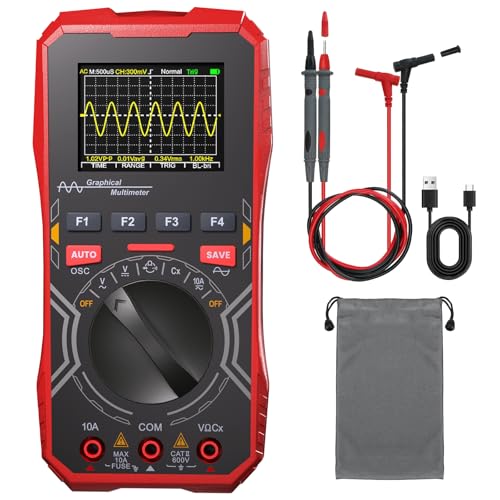
A 2-in-1 handheld oscilloscope multimeter stands out for DIYers just stepping into electronics, especially those working with Arduino, 51 MCUs, or small automation projects. I rely on its 1MHz bandwidth and 2.5MSa/s sampling to capture audio signals, power ripple, and digital pulses accurately. The auto-ranging multimeter measures up to 600V AC/DC, 10A current, 40MΩ resistance, and 100μF capacitance, plus frequency up to 5MHz. I love the pocket-sized design, 2.4-inch backlit display, and included X1/X10 probes. Powered by 3 AAA batteries, it’s portable, safe (with 10A/250V fuse), and perfect for quick field tests, labs, or tinkering at home.
Best For: DIY electronics enthusiasts, students, and hobbyists working on Arduino, 51 MCU, or small-scale circuit projects who need a portable tool for basic waveform analysis and electrical measurements.
Pros:
- Combines a 1MHz oscilloscope and auto-ranging multimeter in a compact, pocket-sized design ideal for fieldwork and lab use
- Features a 2.4-inch backlit display and 3 AAA battery power for portability and visibility in low-light environments
- Includes essential accessories like X1/X10 probes, test leads, and a waterproof storage bag with built-in fuse protection for safety
Cons:
- Single-channel oscilloscope limits simultaneous signal comparison or complex circuit analysis
- 1MHz bandwidth and 2.5MSa/s sampling rate are insufficient for high-frequency or fast digital signals
- No data logging or PC connectivity, reducing utility for extended diagnostics or documentation
Factors to Consider When Choosing a Hobbyist Oscilloscope
You’ll want to check the bandwidth and sampling rate first-most hobbyists do fine with 50-100 MHz and a 1 GS/s rate, which handles Arduino signals, PWM from motor controllers, and I2C bus traffic without breaking a sweat. Look for a bright, responsive display, at least 2.8 inches with good contrast, so you can actually see waveforms in your garage or workshop, and don’t overlook portability-compact designs with rubberized grips fit neatly in a project box or backpack. Make sure it runs on rechargeable batteries with 2+ hours of life, and check what’s included: at minimum, you need a pair of 10x probes with ground springs and decent probe tips for poking at microcontroller pins.
Bandwidth And Sampling Rate
While tracking fast digital signals from an Arduino or debugging communication buses like I²C and SPI, you’ll quickly see why bandwidth and sampling rate aren’t just specs-they’re essential to catching real problems. You need at least 5 times the fundamental frequency of your signal for accurate capture, so for a 20 MHz clock, aim for 100 MHz bandwidth to avoid attenuated amplitudes and distorted edges. Your scope’s sampling rate should be 2.5 to 4 times the bandwidth-so 1 GS/s on a 100 MHz scope keeps waveforms clean and prevents aliasing. Higher real-time sampling lets you catch glitches, short pulses, and timing issues in single-shot events, which is critical when diagnosing erratic sensor behavior or logic errors in robotics or automation projects. Don’t skimp here-weak specs mean missed details.
Display Quality And Size
Don’t let a fuzzy or cramped screen obscure the details you just captured with your scope’s high bandwidth and sampling rate. Aim for at least a 2.8-inch display, especially if you’re using a handheld model while debugging Arduino circuits or robotics projects. A resolution of 320×240 pixels or higher makes waveforms, labels, and measurements easier to read, which matters when you’re spotting signal glitches on a microcontroller line. TFT LCD screens with full-color support improve contrast and help you distinguish multiple traces or overlays during mixed-signal work. Look for white or full-color backlights-they keep the display clear in dim labs or cluttered workbenches. Wider aspect ratios and wide viewing angles mean you won’t lose image quality when peeking from the side, a real plus when you’re working fast and need clarity fast.
Portability And Design
When you’re troubleshooting a finicky Arduino sensor out in the field or setting up a robotics demo at a maker faire, a scope that fits in your pocket can be a game-changer. You’ll love how handheld models weigh just 160 to 400 grams-light enough to carry all day. Most are compact, under 15 cm long and 7 cm wide, so they slip right into your pocket or toolkit. Rugged builds with shock-resistant housings handle bumps and uneven terrain, perfect for student projects or outdoor tinkering. You’ll stay productive thanks to durable designs that protect internals, even when you’re working fast. Plus, Type-C ports make charging simple and let you transfer data on the go. You can toss it in your bag without worry, knowing it’s ready when inspiration-or a circuit fault-strikes.
Power Source And Battery Life
On the go, power matters just as much as performance. You’ll want a scope that keeps up with your projects, not one that quits mid-debug. Most handheld models last 4 to 8 hours on a charge, depending on screen size, sampling rate, and brightness. Larger color TFT displays drain batteries faster, so if you’re working long sessions, consider power efficiency. Many scopes now use rechargeable lithium-ion packs charged via USB-C-just plug in your power bank and keep going. Others run on AA or AAA batteries, which you can swap in seconds when you’re off-grid. That flexibility beats hunting for an outlet. Avoid models with proprietary batteries; they limit your options and cost more over time. Pick one with standard, replaceable cells or easy USB-C charging. You’ll stay powered, focused, and ready for the next robotics tweak or microcontroller fix.
Included Probes And Accessories
You’ve kept your oscilloscope running through long debugging sessions, but now it’s time to make sure your measurements are as accurate as your power supply is reliable. You’ll want probes that match your scope’s bandwidth-don’t let a 100MHz probe drag down a 200MHz scope. Look for 10:1 passive probes; they handle up to 400 Vpp and reduce circuit loading, perfect for Arduino PWM signals or motor driver noise. Some kits include X1, X3, and X10 options, giving you flexibility across logic levels and power rails. Check for solid accessories: BNC-to-banana adapters help with bench power, alligator clips grab small SMD test points, and ground springs minimize ringing on high-speed digital lines. A sturdy carrying case and included 10A/250V fuses keep your gear safe during robotics field tests or crowded workbenches. Don’t overlook these extras-they save time, money, and frustration when debugging microcontrollers or sensor circuits.
Safety Features And Protection
A reliable hobbyist oscilloscope doesn’t just capture clean signals-it keeps you and your gear safe when probing live circuits. You’ll want at least 300 V peak input rating and 1 MΩ impedance to handle common voltage levels without frying the inputs. Always check for overvoltage and overcurrent protection, like 10A/250V fuses, which cut power fast if something goes wrong. Choose models with double insulation and CE certification-they’re built to reduce shock risk around microcontrollers or motor drives. Isolated or differential inputs are a smart pick when measuring high-side signals in robotics or power circuits, since they prevent ground loops and protect your scope. Make sure BNC connectors are well-shielded and use 10:1 probe attenuation for safer high-voltage measurements. These features keep your projects-and you-out of harm’s way, every time you power up.
Functionality And Measurement Modes
When you’re debugging a microcontroller circuit or tuning a motor driver, having more than just waveform display makes all the difference, and that’s where smart functionality really counts. You’ll want dual-channel input to compare clock and data signals side by side, spotting timing delays in I2C or SPI lines. If you’re testing motor drivers or filters, a built-in signal generator lets you inject sine, square, or triangle waves and watch the response. Look for scopes with multimeter mode-measuring resistance, capacitance, or continuity without swapping tools saves time. Auto-measure features give instant readouts of frequency, amplitude, rise time, and duty cycle, no math needed. Trigger modes like single or normal help catch glitches in PWM signals or startup surges. These tools cut debugging time and boost confidence.
Frequently Asked Questions
Can I Use These Oscilloscopes for Audio Signal Analysis?
You can absolutely use these oscilloscopes for audio signal analysis, and they handle it well. With bandwidths from 50–200 MHz, sample rates up to 2 GSa/s, and built-in FFT, you’ll see noise, distortion, and frequency content clearly. Testers confirmed clean 20 Hz–20 kHz tracking, accurate amplitude readings, and real-time waveform updates, perfect for speaker crossover work, amplifier debugging, or microphone signal checks-no guesswork, just reliable, detailed insight right on your bench.
Are Spare Probes Available for These Budget Oscilloscopes?
Yes, you can get spare probes for most budget oscilloscopes, and they’re usually affordable. Brands like DiSo, Rigol, and UNI-T sell replacements directly, often under $20. Standard 10x passive probes with BNC connectors are widely compatible, so you’re not locked in. Testers confirm probes hold up well, though upgrading to higher bandwidth models improves signal clarity, especially above 100 MHz. Always check probe attenuation and input capacitance to match your scope’s specs.
Do Any of These Models Support FFT for Frequency Analysis?
Yes, you’ll find FFT support on most of these models, and it works well for spotting noise, harmonics, or signal distortions in motor drivers or audio circuits. The Rigol DS1054Z delivers a clear 1024-point FFT, perfect for analyzing PWM frequencies or EMI on Arduino boards. Other units like the Hantek 6022BE offer basic FFT, but with fewer resolution points. Testers confirm they’re usable for quick RF checks or filter tuning, though don’t expect lab-grade precision. FFT is definitely usable, just keep sample depth in mind.
How Do I Calibrate a DIY Oscilloscope After Assembly?
You calibrate your DIY oscilloscope by powering it up, connecting the probe to the calibration output, then adjusting the probe’s compensation trimmer until the square wave reads flat-topped and clean, not rounded or overshooting, at 1kHz, 3V peak-to-peak; you verify channel alignment using dual-trace mode, tweak gain and offset via onboard potentiometers, and confirm timing accuracy with a known crystal source, like a 10MHz reference, for reliable real-world signal capture.
Is Firmware Update Support Available for These Devices?
Yes, you can update the firmware on most DIY oscilloscopes, and it’s usually straightforward-just drag the .bin file to a microSD card and reboot. Trusted models like the Mini DSO138 and DSO Shell support field updates that fix bugs, improve sampling stability, and add features like better waveform averaging. Real users report smoother trigger response after updates, and active forums offer tested firmware versions, so you’re not on your own when keeping your scope up to date.