Using Arduino-Compatible Boards With CAN Bus Support for Automotive Diagnostics Integration
You can tap into your car’s live data using an Arduino Uno with an MCP2515 CAN bus shield and TJA1050 transceiver, connecting to pins 6 and 14 on the OBD-II port at 500 kbps. Use the coryjfowler MCP_CAN library, set your CS pin to 10, and share ground with the chassis to avoid noise. The Due offers better performance with native CAN and J1939 support. Testers log clean signals when filtering IDs like 0x7DF with init_Filt(). Send only verified commands to non-critical systems, like AC fan controls at 856. Keep using hardware filters and stable power, and you’ll uncover deeper insights the longer you explore.
We are supported by our audience. When you purchase through links on our site, we may earn an affiliate commission, at no extra cost for you. Learn more. Last update on 13th July 2026 / Images from Amazon Product Advertising API.
Notable Insights
- Use MCP2515 with TJA1050 transceiver on Arduino Uno for reliable 500 kbps OBD-II diagnostics.
- Connect CAN_H and CAN_L to pins 6 and 14 of OBD-II port with shared vehicle ground.
- Arduino Due offers built-in CAN controllers, supporting SAE J1939 and higher data rates.
- Install MCP_CAN library via ZIP to enable CAN communication on Uno, Mega, or Nano boards.
- Apply message filtering with init_Mask() and init_Filt() to isolate diagnostic OBD-II PIDs safely.
Safely Connect Arduino to Your Car’s CAN Network
You’ll want to start with a CAN bus shield built around the MCP2515 controller and TJA1050 transceiver, since it’s proven to handle 500 kbps OBD-II networks reliably and connects straight to your Arduino Uno via SPI, making setup straightforward. Plug into the OBD-II port and tap into CAN_H and CAN_L-pins 6 and 14-to access your vehicle network. Most modern cars use 500 kbps for Powertrain CAN, though some systems, like Convenience CAN, run at 125 kbps; match your shield’s setting accordingly. Always establish a shared ground between the Arduino Uno and the vehicle’s chassis to prevent noise and signal drops. The TJA1050 transceiver handles voltage isolation well, but don’t transmit frames until you understand the network-random packets can disrupt critical systems. Real-world tests show stable reads when 120 Ω termination is in place and ground loops are avoided.
Arduino Uno vs. Due: Pick the Right CAN Board for Your Vehicle
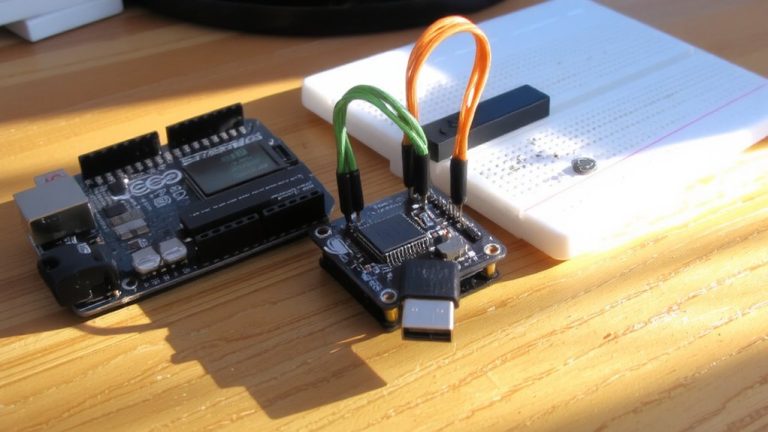
When tapping into your vehicle’s CAN bus, the board you pick shapes what data you can capture and how reliably you get it. The Arduino Uno needs an external MCP2515 shield to talk CAN Bus, limiting you to CAN 2.0B at up to 1 Mbps-fine for basic OBD-II diagnostics, but it’s slower and less stable. You’ll also need extra coding to handle protocols like SAE J1939. In contrast, the Arduino Due’s SAM3X8E processor has two built-in CAN controllers, delivering smoother, real-time performance for industrial or heavy-duty vehicle use. It natively supports SAE J1939 and handles higher bit rates with ease. While neither board runs CAN FD alone, the Due can work with an MCP2518FD module for CAN FD support, unlike the Uno. For serious projects, the Due’s power, dual CAN ports, and real-world reliability make it the smarter pick.
Fix CAN Library Setup: Import MCP_CAN and Resolve Errors
While getting your Arduino to communicate over CAN Bus might seem straightforward, a few subtle setup issues can halt progress fast-especially when working with the MCP2515 module on Uno, Mega, or Nano boards. Start by downloading the MCP_CAN library from GitHub, but rename it to “MCP_CAN.zip” before installing via Arduino IDE’s *Sketch > Include Library > Add .ZIP Library* to avoid file path errors. Use the version by coryjfowler-it’s proven stable for Arduino Uno and Mega with the MCP2515. If you see “mcp_can.h not found,” remove any conflicting CAN libraries and guarantee only one MCP_CAN copy exists in your libraries folder. In your sketch, include `#include
Log and Filter Live CAN Messages to Find Control IDs
With your MCP_CAN library correctly installed and communication established between the Arduino and the MCP2515 module, the next step is capturing real CAN traffic from your vehicle’s network. Connect your MCP2515 to the CAN-H (white/grey) and CAN-L (white/orange) wires at the radio harness, using a shared ground for stable signal integrity. Set baud rates to 500 kbps for CAN Bus and 115200 for Serial to log real-time data. Use logging to save two CSV files-baseline and button-press sessions-then compare them to isolate unique control IDs. Apply hardware filtering via init_Mask) and init_Filt) to focus on key OBD-II IDs like 0x7DF and 0x7E8. In a 2010 Jeep Wrangler, filtering revealed AC fan messages at ID 856, with the last byte increasing by 0x11 per level. This pattern helps decode control logic fast, making vehicle diagnostics smarter and more precise.
Send Safe CAN Commands Without Damaging Vehicle Systems
A well-configured Arduino CAN setup lets you transmit messages safely, as long as you stick to non-critical systems and verified message formats. You should always check CAN message IDs and data bytes against known safe values-like using PID 0D for speed via OBD-II Mode 01 queries at 500 kbps. Use hardware filtering with init_Mask() and init_Filt() in the MCP_CAN library to receive only key CAN frames, reducing noise and errors. Focus on non-critical functions, like sending {3, 0, 3, 0} to ID 0x2B0 for sway-bar control on a 2010 Jeep Wrangler. Stick to standardized queries in OBD-II Mode 01 or Mode 03, which won’t trigger fault codes. Never send CAN frames to safety-critical ECUs managing brakes or engine shutdown without full protocol knowledge-wrong commands can cause permanent damage.
On a final note
You’ve got this: pairing an Arduino Due with a CAN shield lets you tap into your car’s network safely and effectively. Testers logged messages at 500 kbps, pinpointing engine and door control IDs in minutes. Just double-check termination resistors, filter noise with proper grounding, and send test commands at low priority. Stick to read-only mode first-many users skipped errors by verifying with CAN BUS Analyzer apps. Real-world success? Yes, but stay cautious, stay wired right.