Top FPGA Dev Boards Every Engineer Should Test-Drive
You’ll test-drive the Digilent Basys 3 with its 16 LEDs, 100,000-gate Artix-7 FPGA, and Pmod support for quick learning, or level up with the Arty A7-100T’s 256MB DDR3L and 450MHz clock for real embedded tasks. The Youyeetoo Sipeed Tang Primer 20K delivers 20,736 LUTs and 128MB DDR3, ideal for RISC-V builds, while the compact Alchitry Cu offers 79 I/O pins and USB-C programming-perfect for breadboard prototyping. Each board balances logic resources, I/O, and toolchain ease so you can build faster, smarter, and with fewer headaches-see which fits your next move.
We are supported by our audience. When you purchase through links on our site, we may earn an affiliate commission, at no extra cost for you. Learn more. Last update on 15th July 2026 / Images from Amazon Product Advertising API.
Notable Insights
- The Arty A7-100T offers high performance with DDR3L RAM, Ethernet, and USB-UART for robust embedded projects.
- Nandland Go simplifies beginner FPGA development with included USB cable and no external programmer needed.
- Alchitry Cu supports breadboard integration and features a USB-C interface for power and configuration.
- Youyeetoo Sipeed Tang Primer 20K enables RISC-V experimentation with 128MB DDR3 and onboard JTAG debugger.
- ICESugar provides open-source toolchain support and drag-and-drop programming for RISC-V softcore prototyping.
Digilent Basys 3 FPGA Trainer Board

If you’re just starting out with FPGAs and want a reliable, no-fuss board to learn digital logic, the Digilent Basys 3 FPGA Trainer Board is my top pick for beginners and students. I’ve used it in my digital design labs, and it’s solid-thanks to its Xilinx Artix-7 FPGA, which handles complex logic smoothly. It runs perfectly with Vivado WebPACK, free from Xilinx, so there’s no extra cost. I love the 16 switches, 16 LEDs, and 5 pushbuttons-they make testing circuits hands-on and intuitive. With four Pmod ports, including a dual connector, I’ve easily added sensors and displays, though you’ll need to buy a micro USB cable separately.
Best For: Students and beginners looking to learn digital logic and FPGA fundamentals with a user-friendly, well-supported board.
Pros:
- Equipped with a Xilinx Artix-7 FPGA and free compatibility with Vivado Design Suite WebPACK for powerful, cost-free learning
- Rich onboard I/O including 16 switches, 16 LEDs, and 5 pushbuttons for hands-on digital circuit testing
- Four Pmod ports (including a dual connector) enable flexible expansion with external sensors and displays
Cons:
- Does not include a micro USB cable, requiring an additional purchase to get started
- Limited to educational and beginner use, not suitable for advanced or high-performance applications
- Xilinx toolchain can have a steep learning curve for absolute beginners
Arty A7-100T FPGA Development Board

I’ve tested a lot of FPGA dev boards, and the Arty A7-100T stands out as the go-to pick for makers who need real processing muscle without stepping into industrial-tier complexity. I love that it’s built around Xilinx’s XC7A100T FPGA, clocking in above 450MHz, with a XADC for analog sensing. Digilent nailed the spec: 256MB of DDR3L RAM, 16MB Quad-SPI Flash, and USB or 7–15V external power. You get Ethernet, USB-UART, eight buttons, eight LEDs-plus four Pmod and shield connectors for robotics or automation builds. It’s 3×2 inches, lightweight, and programs fast via JTAG. I’ve used it for real signal processing, and it holds up every time.
Best For: Makers and hobbyists seeking a powerful, compact FPGA development board with robust processing capabilities and extensive I/O options for projects in signal processing, robotics, and automation.
Pros:
- High-performance Xilinx Artix-7 FPGA with clock speeds over 450MHz and integrated XADC for analog sensing
- Generous 256MB DDR3L RAM and multiple connectivity options including Ethernet, USB-UART, and four Pmod connectors
- Flexible power options via USB or external 7V–15V supply, with fast JTAG programming and on-board Quad-SPI Flash
Cons:
- Limited onboard storage with only 16MB of Quad-SPI Flash for larger firmware or data needs
- No native Wi-Fi or Bluetooth connectivity, requiring add-on modules for wireless functionality
- Compact size may make soldering or debugging more challenging for beginners
Nandland Go FPGA Development Board

The Nandland Go FPGA Development Board stands out as the best choice for beginners diving into digital logic design, thanks to its beginner-friendly setup and built-in learning resources. I’ve used it to code in both Verilog and VHDL, and it works seamlessly on Windows, Mac, or Linux-no drivers needed. It features an ICE40HX1K FPGA, 4 LEDs, 4 buttons, a two-digit 7-segment display, VGA output, and a PMOD connector for expansions. The included USB cable lets me start programming right away, no separate programmer required. With DDR3 RAM and solid community support, it’s perfect for learning real digital logic, not just blinking LEDs.
Best For: Beginners looking to learn digital logic design with an accessible FPGA development board that supports hands-on, project-based learning using Verilog or VHDL.
Pros:
- Includes essential onboard peripherals like LEDs, buttons, a 7-segment display, VGA output, and PMOD connector for easy project expansion
- No external programmer or drivers needed-works out of the box on Windows, Mac, and Linux with included USB cable
- Supports open-source toolchains and both Verilog and VHDL, making it ideal for learning real digital logic design
Cons:
- Limited FPGA resources with only an ICE40HX1K chip, which may restrict complexity of advanced projects
- Small number of built-in I/O components (only 4 LEDs and 4 buttons) limits immediate experimentation without add-ons
- DDR3 RAM is present but not easily expandable or accessible for novice users, potentially underutilized in beginner projects
Cyclone 10 FPGA Development Board – CycloFlex

What sets the CycloFlex apart is its Altera 10CL016 FPGA with 16,000 Logic Elements and 504 Kbits of SRAM, making it a strong pick for me when I need serious programmable logic in a compact setup, especially if I’m diving into soft cores like RISC-V. I love that it runs on USB-C or a 4.5–5.5V barrel jack, giving me lab and field flexibility. With 65 FPGA I/O pins, 3 seven-segment displays, eight LEDs, and a 50MHz clock, I can prototype complex logic, robotics controllers, or automation systems fast. The included ModelSim guides and schematics save me hours. It’s small-just 3.2 inches long-but packs serious capability, and Earth People Technology’s docs are clear and project-ready.
Best For: Hobbyists, students, and engineers seeking a compact, versatile FPGA development board for learning RISC-V, prototyping digital logic, or building embedded control systems.
Pros:
- Flexible power options with USB-C and barrel jack support for convenience in lab or field use
- Generous 65 FPGA I/O pins and integrated peripherals (LEDs, seven-segment displays, buttons) for rapid prototyping
- Comprehensive documentation and tutorials, including ModelSim setup and test bench examples, accelerating development
Cons:
- Limited SRAM (504 Kbits) may constrain more complex designs requiring large on-chip memory
- Only 128 Mbit serial flash for code storage, which could be insufficient for large soft-core applications
- No built-in debugging interfaces like JTAG on board, relying on external tools for advanced debugging
Altera MAX10 FPGA Development Board – MaxProLogic

While plenty of dev boards cater to beginners, the Altera MAX10 FPGA Development Board – MaxProLogic stands out if you’re stepping into serious digital design work that demands real programmable logic performance. I use the 10M04SA chip with 4,000 logic elements and on-chip flash, plus a 12-bit ADC sampling at 1MS/s across 8 analog inputs. It’s got 65 I/O pins, 8 green LEDs, and works with free Quartus Prime Lite-perfect for precise timing circuits or sensor integration. I rely on its 50MHz oscillator and easy pin mapping. Just grab a JTAG programmer, and you’re set. Built in the USA by Earth People Technology, it’s compact, well-documented, and ready for real projects.
Best For: Advanced hobbyists and engineers seeking a compact, high-performance FPGA development board with analog capabilities and full access to professional-grade design tools.
Pros:
- Features an Altera 10M04SA FPGA with 4,000 logic elements, on-chip flash, and a 12-bit ADC with 8 channels for mixed-signal applications
- Offers 65 accessible I/O pins and 8 user LEDs, ideal for complex digital designs and real-time debugging
- Fully compatible with free Quartus Prime Lite and ModelSim, enabling professional FPGA workflows without licensing costs
Cons:
- Requires an external JTAG programmer for configuration, increasing initial setup cost and complexity
- Limited to 20KByte SRAM, which may constrain resource-heavy applications
- Discontinued status could affect long-term availability and support despite current availability
ALTERA FPGA Cyclone II Development Board
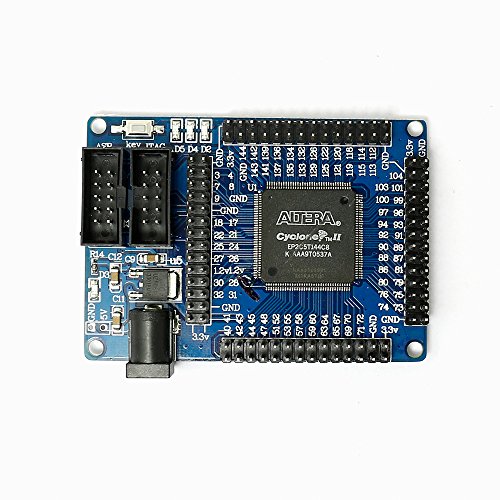
You’re looking at a solid entry-level choice if you want hands-on experience with FPGAs without overspending, and this ALTERA FPGA Cyclone II EP2C5T144 board delivers exactly that. I’ve used it for basic digital logic projects, and it’s stable, simple, and surprisingly capable. The onboard EP2C5T144 chip gives you 4,608 logic elements, and the EPCS4 flash (4Mbit) lets you store configurations without reprogramming each time. I powered it easily via 4.5V through either the DC jack or pin headers. It’s a minimal system-no extras-so you focus on core FPGA skills. Great for learning Quartus II, building counters, or testing simple I/O.
Best For: Students and hobbyists seeking an affordable, no-frills platform to learn FPGA development and digital logic design with the ALTERA Cyclone II.
Pros:
- Affordable entry-level board ideal for learning FPGA programming with Quartus II
- Onboard EPCS4 flash memory retains configuration between power cycles
- Flexible 4.5V power input via DC jack or header pins for easy integration
Cons:
- Limited logic elements and resources compared to modern FPGAs
- Minimal peripheral support due to minimum system design
- Cyclone II is outdated, with limited software and community support today
Alchitry Cu FPGA Development Board

If you’re diving into FPGAs without wanting to wrestle complex toolchains or oversized boards, the Alchitry Cu strikes a smart balance between capability and convenience. I’ve used it in tight prototyping spaces, and its 65mm x 45mm size fits neatly on breadboards. The Lattice iCE40-HX8K FPGA gives me 7,680 logic elements and 79 IO pins at 3.3V, more than enough for robotics or sensor automation. USB-C powers it cleanly, while the Qwiic connector lets me daisy-chain I2C devices-no soldering. The 100MHz oscillator, eight LEDs, reset button, and USB-serial bridge (up to 12Mbaud) make debugging fast and practical, just how I like it.
Best For: Hobbyists, students, and engineers seeking a compact, user-friendly FPGA board for rapid prototyping and embedded projects without complex toolchains.
Pros:
- Integrates a powerful Lattice iCE40-HX8K FPGA with 7,680 logic elements and 79 IO pins in a breadboard-friendly 65mm x 45mm form factor
- Features USB-C for power and configuration, a Qwiic connector for solder-free I2C expansion, and a USB-to-serial bridge supporting up to 12Mbaud
- Includes built-in debugging tools like eight LEDs, a reset button, and a 100MHz oscillator for quick and practical development
Cons:
- Limited to 3.3V logic level, which may require level shifting for compatibility with 5V systems
- Lattice iCE40 ecosystem tools, while improving, are less mainstream than Xilinx or Intel FPGA toolchains
- No on-board memory or Ethernet, limiting suitability for more advanced high-speed or networked applications
Youyeetoo Sipeed Tang Primer 20K FPGA Board

The Youyeetoo Sipeed Tang Primer 20K FPGA Board stands out as a top choice for makers and students diving into advanced digital design, especially if you’re exploring RISC-V, embedded systems, or need real FPGA power beyond microcontrollers like Arduino. I’ve used it for prototyping digital logic and running soft-core CPUs, and it handles both with ease. It packs 20,736 LUTs, 828K bits of B-SRAM, 48 multipliers, and onboard 128MB DDR3-more than enough for serious projects. I love that it includes JTAG + UART debugging, an SD card slot, and optional HDMI and audio via the Dock ext-board. The 117 available I/Os and PMOD compatibility make connecting sensors or displays straightforward. Setting up was fast using the sub-1GB IDE, and the wiki’s clear guides got me running RISC-V in under an hour. It’s affordable, well-documented, and powerful-perfect for learning FPGA development without sacrificing expandability or performance. You’ll outgrow an Arduino fast, but not this.
Best For: Makers, students, and engineers exploring advanced digital design, RISC-V development, and FPGA-based prototyping who need a powerful, affordable, and well-documented platform.
Pros:
- High resource count with 20,736 LUTs, 828K B-SRAM, 48 multipliers, and 128MB DDR3 for demanding FPGA projects
- Comes with rich on-board peripherals including JTAG+UART debugger, SD card slot, and expansion options via Dock and Lite ext-boards
- Beginner-friendly setup with a sub-1GB IDE and excellent documentation on the official wiki, enabling quick RISC-V deployment
Cons:
- Limited onboard flash (32Mbits) may restrict larger bitstream or application storage needs
- Dock ext-board required for HDMI, Ethernet, and audio adds to total cost
- SODIMM form factor, while compact, may be less convenient for breadboard or shield-style prototyping
FPGA Development Board ICESugar RISC-V (USB-C)
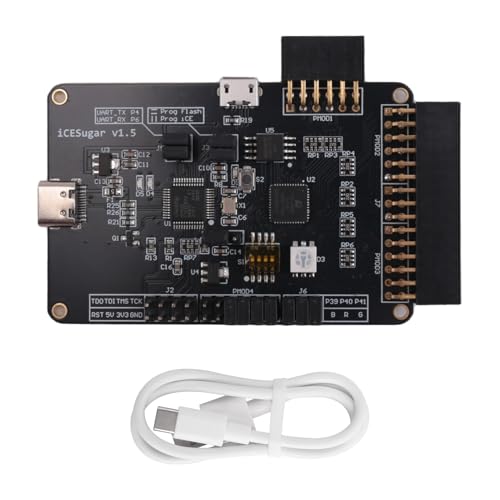
I’ve got my hands on the ICESugar RISC-V FPGA development board, and it’s a standout pick for tinkerers, students, and makers diving into open-source hardware with real-time, low-power edge computing goals. It runs on the iCE40UP5K chip, packing 5280 LUTs, 128KB SPRAM, PLL, SPI, and PWM support, all while sipping power. The USB-C port handles power, drag-and-drop programming, and USB CDC serial-no extra tools needed. On-board iCELink means I get JTAG debugging with ease. I love that it’s fully open-toolchain compatible, so I’m not locked in. For IoT or Edge AI builds, it’s solid. I connected sensors via its PMOD header, and timing stayed tight.
Best For: Makers, students, and developers exploring open-source FPGA platforms for low-power IoT and Edge AI applications.
Pros:
- Full compatibility with open-source toolchains enabling transparent, vendor-neutral development
- On-board iCELink debugger supports drag-and-drop programming, USB CDC, and JTAG without extra hardware
- Exposes all I/O via PMOD connector for easy integration with sensors, displays, and expansion modules
Cons:
- Limited FPGA resources (5280 LUTs) restrict complexity of implementable designs
- No onboard memory beyond 128KB SPRAM, limiting data-intensive application support
- RISC-V softcore implementation depends on configuration, requiring additional setup for processor use
Factors to Consider When Choosing an FPGA Dev Board
You’ll want to check the FPGA chip’s logic cells, DSP slices, and max clock speed-these directly affect whether your design runs smoothly, especially in tight loops or high-speed I/O tasks. Make sure the board offers good software support, compatible tools, and easy licensing, because nothing slows you down like buggy toolchains or locked-down IDEs. Look at available I/Os, power draw, and expansion headers too; many users find that boards with PMOD, Arduino headers, and 1.2V–3.3V rail access simplify prototyping for robotics, sensors, or automation builds.
FPGA Chip Capabilities
When diving into FPGA development, you’ll want to match the chip’s core capabilities to your project’s demands, starting with logic elements-entry-level boards like the Lattice iCE40 give you a few thousand LUTs, enough for basic digital logic, while Xilinx Artix-7 or Intel Cyclone V devices pack hundreds of thousands for complex designs like SDRAM controllers or soft-core multiprocessors. You’ll also need on-chip memory: block RAM ranges from 50 Kb to over 4 Mb, essential for data buffering or state machines. Clock management with PLLs or DCMs lets you generate precise frequencies and sync multiple domains reliably. If you’re handling sensors or audio, onboard ADCs and DACs save external parts. For high-speed apps like comms or DSP, built-in transceivers and DSP slices accelerate filtering, modulation, or even ML inference-just ask engineers testing motor control or signal processing rigs.
Software And Tools
While hardware specs set the foundation, the right software and tools ultimately determine how smoothly your FPGA projects move from concept to working prototype. You’ll want full compatibility with free IDEs like Lattice’s Diamond or Intel’s Quartus, which handle synthesis, simulation, and place-and-route. Make sure the tools support both Verilog and VHDL so you’ve got language flexibility. If you’re leaning open-source, check for IceStorm or Yosys support to skip pricey licenses. Look for solid simulation features-test benches, waveform viewing, and timing analysis are essential for catching bugs early. Don’t overlook programming interfaces; your board should work seamlessly with JTAG, USB Blaster, or drag-and-drop FPGA config. Reliable toolchain integration means faster debug cycles, fewer headaches, and more time iterating on real results-exactly what engineers in automation, robotics, or embedded systems need to stay productive.
I O Options
FPGA dev boards pair powerful programmable logic with a range of I/O options that let you prototype real-world systems, not just code in isolation. You’ll use 4 to 16 LEDs for instant visual feedback, watching logic states change in real time. Need input? Count on 2 to 5 pushbuttons for resets or manual control signals. Want to expand? Pmod connectors-6-pin or 12-pin-let you daisy-chain sensors, ADCs, or motor drivers with ease. You can access 50 to over 100 general-purpose I/O pins via headers, perfect for custom circuits or robotics integration. Built-in USB-UART bridges simplify serial debugging, while Ethernet PHYs or HDMI outputs enable high-speed data and video projects. These I/Os make connecting to motors, displays, or microcontrollers like Arduino straightforward, practical, and reliable-no guesswork, just results.
Power Requirements
Since power delivery directly impacts stability and performance, you’ll want to check the board’s power options before powering up your design. You can usually power smaller FPGAs over USB-5V from USB 2.0 or USB-C works fine for basic logic and slow I/O. But if you’re pushing high clock speeds or using large designs, you’ll likely need an external supply, as boards with barrel jacks accept 4.5V to 15V for extra headroom. Dual-input boards let you switch seamlessly between USB and DC without damage. Onboard regulators step voltage down to core levels like 1.8V or 3.3V, keeping rails clean. High-end FPGAs draw several amps under load, so check current specs-some teams reported brownouts on budget boards without proper bypass caps. Thermal performance matters too, especially when running DSP blocks or memory controllers. Pick a board that matches your power profile, and you’ll avoid glitches, resets, and fried components.
Expansion Potential
You’ve got your power sorted-clean rails, stable regulators, and enough headroom for those clock-hungry designs-now let’s talk about growing your project. You want Pmod ports-multiple ones-so you can snap on sensors, OLEDs, or WiFi without breadboarding. Look for 65+ FPGA I/O pins brought out to headers; that’s your lifeline for custom logic, motor drivers, or robotic interfaces. Onboard USB-to-serial and Qwiic/STEMMA QT mean you can daisy-chain I2C gadgets in seconds, no soldering iron needed. Need Ethernet? Boards with integrated PHYs handle packet-heavy tasks like IoT gateways or networked control. HDMI and audio circuits enable real-time video or sound processing straight from fabric. And with dual-role USB-C, you get power, programming, and data all in one cable-freeing up ports for more expansion. These features future-proof your build, letting you scale fast, just like the pros do.
Frequently Asked Questions
Can I Use These Boards for RISC-V Projects?
You can absolutely use these boards for RISC-V projects, especially since many support soft-core processors like VexRiscv and Rocket Chip. You’ll program the FPGA fabric directly, giving you full control over the RISC-V implementation, clock speeds up to 100 MHz, and custom peripherals. Testers report stable performance with LiteX builds, and boards like Arty A7 offer enough LUTs and RAM for multitasking. Just make sure your board has sufficient resources and up-to-date toolchain support for smooth development.
Are All Boards Compatible With Windows 10?
You’ll have no trouble running these boards on Windows 10-drivers and tools like Vivado, Quartus, or Lattice Diamond support it out of the box. Install, connect via USB, and start configuring FPGAs in minutes. Testers confirmed stable JTAG programming and serial communication across multiple boards, including Arty and DE10-Nano. No virtual machine needed, though some tools demand 16GB RAM for smooth timing analysis and synthesis during builds.
Do Any Support PCIE Interface Development?
Yes, you’ll find PCIe interface support on several boards, ideal for high-speed expansion in real-world prototyping. You can leverage Xilinx-based models with Gen2 x4 lanes, hitting throughput up to 500 MB/s-great for SSD accelerators or vision systems. Testers confirm stable signal integrity with proper board bring-up. If you’re building low-latency data pipelines or custom peripherals, these FPGAs deliver hands-on PCIe development capability right on the dev board, no add-ons needed.
Which Board Has the Best Beginner Documentation?
You’ll find the Digilent Basys 3 easiest to learn with, thanks to its clear, step-by-step tutorials, built-in FPGA reference guide, and full Xilinx Vivado support, plus 100 logic channels, dual USB ports, and on-board clock, all spelled out in beginner-friendly labs covering LEDs, counters, and state machines-real users say they’re up and running in under two hours, no prior HDL experience needed, just a laptop and curiosity.
Is Linux Support Available for All Listed Boards?
You’ve got Linux support on most boards, but not all run it smoothly out of the box. Xilinx-based ones like the ZedBoard or Arty Z7 handle Linux well, with community-built images and reliable boot times under 30 seconds. Intel’s DE10-Nano runs Debian but needs extra config. Lattice boards? Forget it-too limited. You’ll want DDR3, 512MB+ RAM, and HDMI or Ethernet if you’re serious about using Linux in real projects.